• Welcome to the new COTI server. We've moved the Citizens to a new server. Please let us know in the COTI Website issue forum if you find any problems.
  • We, the systems administration staff, apologize for this unexpected outage of the boards. We have resolved the root cause of the problem and there should be no further disruptions.

CT Only: Continuing down the LBB recreation rabbit hole.

So, now I am in a "How Far Is Going Too Far?" moment.

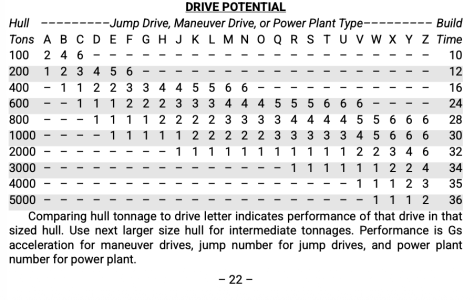
I'm on Page 22 and working on the Drive Potential Table. This is the original table from the 1981 LBB:
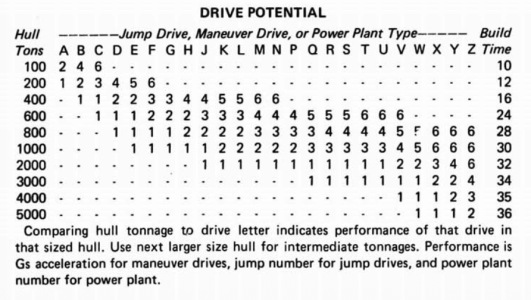
1766241518579.png

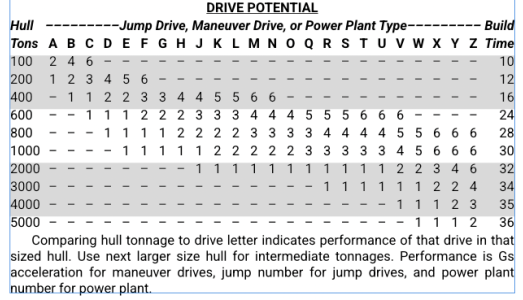
In my version, I added alternating rows of grey to make it easier to read:
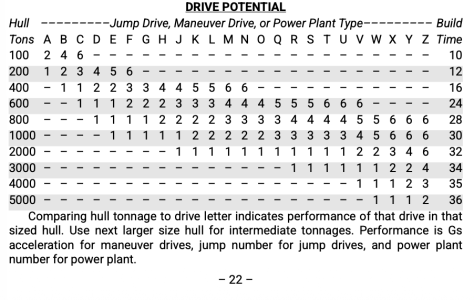
1766241556368.png
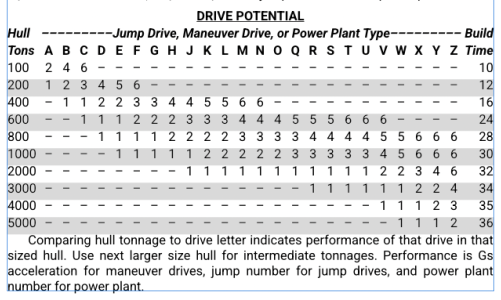
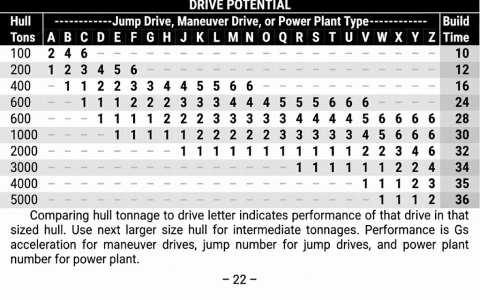
But then I had some fun and threw it at Google Gemini and asked it to make the table look better, and it came up with this design:
1766241606053.png
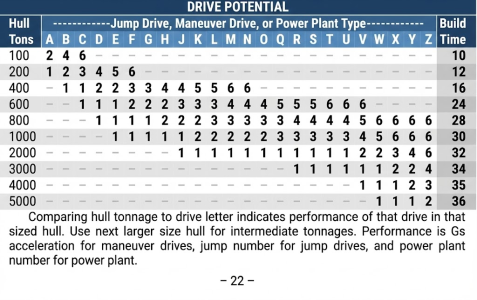
If the books were in color, Gemini gave me this:
1766241648083.png
I think the color table, though impressive, is going too far. It would also increase the POD print costs by needing to do color.

My version with the alternating rows, I think, balances maintaining the appearance of the LBBs and adding a little readability improvement to the original.

But the black and white Gemini version looks nice. And I think it's easier to read that my little update.
 
So, now I am in a "How Far Is Going Too Far?" moment.

I'm on Page 22 and working on the Drive Potential Table. This is the original table from the 1981 LBB:

View attachment 7146

In my version, I added alternating rows of grey to make it easier to read:

View attachment 7147
But then I had some fun and threw it at Google Gemini and asked it to make the table look better, and it came up with this design:

View attachment 7148
If the books were in color, Gemini gave me this:

View attachment 7149
I think the color table, though impressive, is going too far. It would also increase the POD print costs by needing to do color.

My version with the alternating rows, I think, balances maintaining the appearance of the LBBs and adding a little readability improvement to the original.

But the black and white Gemini version looks nice. And I think it's easier to read that my little update.
I prefer your reworked version: maybe if the "Build Time" were not bolded in the Gemini version I'd prefer that (if the idea is to bold the important bit, then I think just the contents of the table, "Drive Potential" per the heading, should be bolded. But also not a fan of white text on black background.
 
1766252450184.png
(Image from @plazman30 )

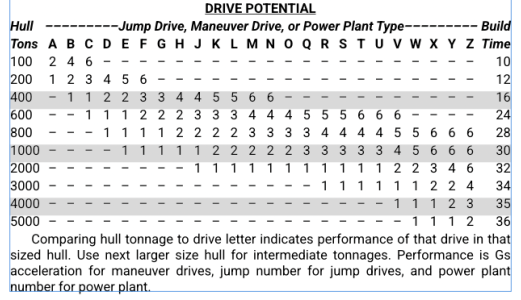
When I create these sort of tables, I find shading every third row (instead of every other row) easier to use. It is easier for the eye to follow the wide white and narrow grey stripes without jumping a row. It is still easy to differentiate the white row above a grey row from the white row below a grey row.

Maybe shade rows 100, 600, 2000 & 5000.
Just something to try out and see how you like it.
 
Why stop there?
On_Beyond_Zebra.jpg
Oh, right. No room left on the page...

(Apologies for the off-topic content. I really like this project!)
 
View attachment 7150
(Image from @plazman30 )

When I create these sort of tables, I find shading every third row (instead of every other row) easier to use. It is easier for the eye to follow the wide white and narrow grey stripes without jumping a row. It is still easy to differentiate the white row above a grey row from the white row below a grey row.

Maybe shade rows 100, 600, 2000 & 5000.
Just something to try out and see how you like it.
LIke this?

1766262500084.png
 
Honestly can't say those look any better. Maybe on larger tables, but with one that short, alternate rows seems better to me.
 
I'd like to change the page numbering in the facsimile edition also, so that it shows the book number and page number: 2-48. I think that would make it easier to know where you are in the book and which book you're in.

Just thinking ahead, you would want to do B2-48 (Book 2, p.48); A2-48 (Adventure 2, p.48); DA2-48 (Double Adventure 2, p. 48); S2-48 (Supplement 2, p.48); etc
 
I wonder if recreating the 3 LBBs is the way to go. Might have been better to do The Traveller Book. That one is available as a POD, but it's still a scan. But that would take a LOT more work.
 
Have another Book 2 oddity that I think could use a "correction."

Page 29 ends with Ordnance description. Then, page 30 has a bunch of charts on it. Page 31 has a full-page example of combat. Page 32 then continues this ordnance description. If you're reading the book, you'd get confused that ordnance ends mid-sentence, and the next page with text is a whole new section. I'm wondering if Page 31 should have a box around the text to let the reader know it is its own separate block of text and not a continuation of the existing text.

I'd post screenshots, but that would post 6 pages of Book 2, and I wish not to invoke the wrath of the copyright gods.

I think there needs to be a visual indicator that this is not part of the paragraph text.

Opinions of the best way to do this and maintain the "feel" of the LBBs?
 
It's almost as if pp.30 - 31 were intended as a QRS for ship combat: charts on one side, turn sequence on the other. So putting a box around them seems fairly unobtrusive.
 
On Page 37 now. Hopefully, I can finish this by the end of the week. Not too bad for switching from Scribus to Affinity Publisher halfway through the process. This is a good exercise for learning a new app. Well worth the time.
 
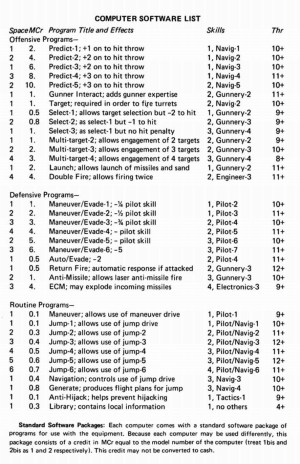
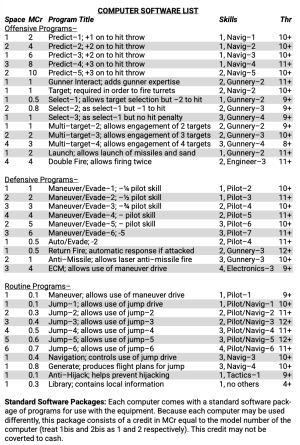
So, I learned a trick today which immensely sped up my workflow. I can take a screenshot from any LBB table and throw it in a Large Language Model (aka AI) and ask it created and editable table from that. I can then open that in a spreadsheet (LibreOffice Calc in my case) and then copy and paste that into Affinity Publisher as a table, edit it and clean it up.

I was typing the tables out by hand, which could take quite a while.

Here is Page 41 from LBB 2:

1766523680955.png

And here is what I could do in about 5 minutes using an LLM to create an editable for me:

1766523743561.png
That table would have taken me easily 30-45 min to type in and clean up.
 
So close to done. Need to take a break to get some Christmas stuff done. Hopefully, I can put some finishing touches on it tonight and call it quits.

I need to do a little cleanup on books 1 and 2. But by the end of the week, I should have personal copies of the LBBs done in an editable format suitable for POD. Sadly, POD is limited to Mixam, probably because of what is now a custom size. I'd love for this to someday be available as a POD option for everyone, just to crush the souls of the eBay sellers charging exorbitant prices for LBBs books in deplorable conditions.
 
Back
Top