• Welcome to the new COTI server. We've moved the Citizens to a new server. Please let us know in the COTI Website issue forum if you find any problems.
  • We, the systems administration staff, apologize for this unexpected outage of the boards. We have resolved the root cause of the problem and there should be no further disruptions.

Need Help Finding a Solution

Murph

SOC-14 1K
I need a mapping tool for sectors and subsectors, but one that allows me to place the worlds as my hand drawn maps are set up, name the planets, and perhaps add starport and UPP. Al the ones I find are either set up to create random maps which I do not need, or want you to know some python programming, which I do not. All I want is something that allows me to place a dot, a starport type, and the name of the world.

Is there anything out there that allows free form map building so I could finally add my hand drawn subsector(s) and sector into something that looks...less hand drawn?
 
Last edited:
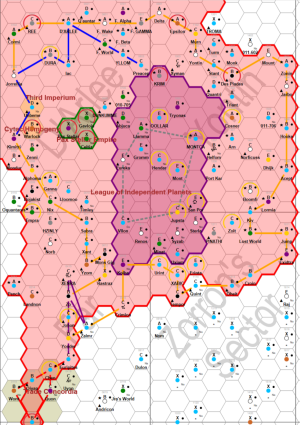
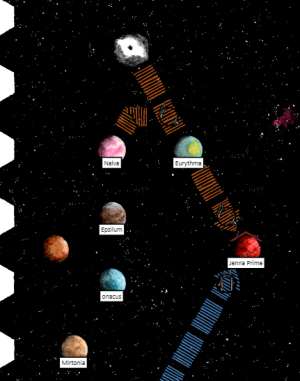
there are also a few mapping programs out there, as well as the Travellermap API. Below are images from Hexkit (pretty cheap hex mapper) and from the mapping API with my own data. A tiny learning curve for either but you can cheat and pull down an existing data set then just update for the Traveller Map. Pretty much how I did it :)1771535917173.png1771535859821.png
edit: the colors and routes use metadata and that took a bit of playing but once you have it set up, easy to make changes.
 
I no longer have a Windows computer, all I have are Linux or Mac. This is going to be a project I suspect. The Traveller Map looking map is perfect, and exactly what I am looking for!
 
DOSBox runs on nearly everything, including Android (and I believe iPadOS). It might be possible to find an obscure but not abandoned platform that it doesn't run on, but...

The downloads of the "official" releases can be found at https://www.dosbox.com/download.php?main=1 but your favorite ad-laden search engine can probably find forks with additional capabilities.
 
Here is a simple HTML form that you can use to feed Travellermap.

The game is getting your data formatted properly.

Take a look at this section of the API: https://travellermap.com/doc/api#poster-render-a-sector-quadrant-or-subsector

Under POST section it talks about sector data and the formats it supports.

I suggest you download the samples (I would suggest the SEC and MSEC formats).

Download this HTML file (there's a trivial bit of javascript at the bottom to skip empty fields). Then open it in your browser.

At the top it lets you upload the sector and metadata files.

Then it lets you mess with the options.

Also attach is a trival hacked, "minimal" SEC file.

The most important thing to note on the SEC file is that, apparently, PBG and Allegiance are both required. They can not be blank.

Other than that, yea, the SEC file is rather picky -- c'est la vie. You can try your luck with the tab T5 style and XML metadata files.

I have not played with the meta data, but seems mostly straightforward.

*sigh* this thing won't let me attach anything but PNG files.

I'll post the html in the next post.
 
Here's the HTML file, CODEX AI did most of the heavy lifting here.

Code:
<!doctype html>
<html lang="en">
<head>
  <meta charset="utf-8" />
  <meta name="viewport" content="width=device-width, initial-scale=1" />
  <title>Traveller Map Poster API – POST Form</title>
  <style>
    body { font-family: Arial, sans-serif; margin: 24px; line-height: 1.3; }
    h1 { font-size: 20px; margin-bottom: 8px; }
    .grid { display: grid; grid-template-columns: repeat(auto-fit, minmax(260px, 1fr)); gap: 12px 16px; }
    label { display: block; font-weight: 600; margin-bottom: 4px; }
    input, select { width: 100%; padding: 6px 8px; box-sizing: border-box; }
    .hint { font-size: 12px; color: #555; }
    .section { margin: 16px 0 8px; font-weight: 700; }
    button { padding: 8px 14px; font-size: 14px; }
  </style>
</head>
<body>
  <h1>Poster API (POST)</h1>
  <div class="hint">POSTs to <code>https://travellermap.com/api/poster</code> using <code>multipart/form-data</code>.</div>

  <form action="https://travellermap.com/api/poster" method="post" enctype="multipart/form-data">
    <div class="section">Files</div>
    <div class="grid">
      <div>
        <label for="file">Sector Data File (required)</label>
        <input id="file" name="file" type="file" />
        <div class="hint">Field name must be <code>file</code>.</div>
      </div>
      <div>
        <label for="metadata">Metadata File (optional)</label>
        <input id="metadata" name="metadata" type="file" />
        <div class="hint">Field name must be <code>metadata</code>.</div>
      </div>
    </div>

    <div class="section">Content Selection</div>
    <div class="grid">
      <div>
        <label for="sector">Sector</label>
        <input id="sector" name="sector" type="text" placeholder="e.g. Spinward Marches" />
      </div>
      <div>
        <label for="quadrant">Quadrant</label>
        <select id="quadrant" name="quadrant">
          <option value="">(none)</option>
          <option>Alpha</option>
          <option>Beta</option>
          <option>Gamma</option>
          <option>Delta</option>
        </select>
      </div>
      <div>
        <label for="subsector">Subsector (A–P)</label>
        <select id="subsector" name="subsector">
          <option value="">(none)</option>
          <option>A</option><option>B</option><option>C</option><option>D</option>
          <option>E</option><option>F</option><option>G</option><option>H</option>
          <option>I</option><option>J</option><option>K</option><option>L</option>
          <option>M</option><option>N</option><option>O</option><option>P</option>
        </select>
      </div>
      <div>
        <label for="domain">Domain</label>
        <select id="domain" name="domain">
          <option value="">(none)</option>
          <option>Sylea</option>
          <option>Vland</option>
          <option>Gateway</option>
          <option>Ilelish</option>
          <option>Antares</option>
          <option>Sol</option>
          <option>Deneb</option>
        </select>
      </div>
      <div>
        <label for="milieu">Milieu</label>
        <input id="milieu" name="milieu" type="text" placeholder="e.g. M1900" />
      </div>
      <div>
        <label for="lint">Lint</label>
        <select id="lint" name="lint">
          <option value="">(default)</option>
          <option value="1">1 (fail on warnings/errors)</option>
        </select>
      </div>
    </div>

    <div class="section">World-Space Rectangle (optional)</div>
    <div class="grid">
      <div>
        <label for="x1">x1</label>
        <input id="x1" name="x1" type="number" />
      </div>
      <div>
        <label for="y1">y1</label>
        <input id="y1" name="y1" type="number" />
      </div>
      <div>
        <label for="x2">x2</label>
        <input id="x2" name="x2" type="number" />
      </div>
      <div>
        <label for="y2">y2</label>
        <input id="y2" name="y2" type="number" />
      </div>
    </div>

    <div class="section">Rendering Options</div>
    <div class="grid">
      <div>
        <label for="scale">Scale (pixels/parsec)</label>
        <input id="scale" name="scale" type="number" placeholder="64" />
      </div>
      <div>
        <label for="rotation">Rotation</label>
        <select id="rotation" name="rotation">
          <option value="">(none)</option>
          <option value="1">1 (90° clockwise)</option>
          <option value="2">2 (180°)</option>
          <option value="3">3 (90° counterclockwise)</option>
        </select>
      </div>
      <div>
        <label for="hrotation">HRotation (degrees)</label>
        <input id="hrotation" name="hrotation" type="number" placeholder="60" />
      </div>
      <div>
        <label for="clampar">Clamp Aspect Ratio</label>
        <select id="clampar" name="clampar">
          <option value="">(none)</option>
          <option value="1">1 (clamp)</option>
        </select>
      </div>
      <div>
        <label for="options">Options</label>
        <input id="options" name="options" type="text" placeholder="rendering options" />
      </div>
      <div>
        <label for="style">Style</label>
        <select id="style" name="style">
          <option value="poster">poster</option>
          <option value="print">print</option>
          <option value="atlas">atlas</option>
          <option value="candy">candy</option>
          <option value="draft">draft</option>
          <option value="fasa">fasa</option>
          <option value="terminal">terminal</option>
          <option value="mongoose">mongoose</option>
          </select>
      </div>
      <div>
        <label for="accept">Accept</label>
        <select id="accept" name="accept">
          <option value="">(default image)</option>
          <option value="application/pdf">application/pdf</option>
          <option value="image/svg+xml">image/svg+xml</option>
        </select>
      </div>
      <div>
        <label for="thumb">Thumbnail</label>
        <select id="thumb" name="thumb">
          <option value="">(none)</option>
          <option value="1">1 (16 px/parsec)</option>
        </select>
      </div>
      <div>
        <label for="compositing">Compositing</label>
        <select id="compositing" name="compositing">
          <option value="">(none)</option>
          <option value="1">1 (clip hex borders)</option>
        </select>
      </div>
    </div>

    <div class="section">Submit</div>
    <button type="submit">Render Poster</button>
    <button type="reset">Reset</button>
  </form>
  <script>
    document.querySelector("form").addEventListener("submit", (e) => {
      const form = e.target;
      for (const el of Array.from(form.elements)) {
        if (!el.name) continue;
        if (el.type === "file" && el.files && el.files.length > 0) continue;
        if (el.value === "") {
          el.disabled = true;
        }
      }
    });
  </script>
</body>
</html>

Minimal SEC file
Code:
 1-14: Name
15-18: HexNbr
20-28: UWP
   31: Bases
33-47: Codes & Comments
   49: Zone
52-54: PBG
56-57: Allegiance
59-74: Stellar Data

....+....1....+....2....+....3....+....4....+....5....+....6....+....7....+....8

Zeycude       0101 C430698-9                       613 Zh                
Reno          0102 C4207B9-A    De He Na Po Pi  A  603 Zh G8 V M1 V      
Errere        0103 B563664-B  F Ni Ri O:0304       910 Zh M1 V M4 V      
Cantrel       0104 C566243-9    Lo                 520 Zh F1 V
 
Back
Top