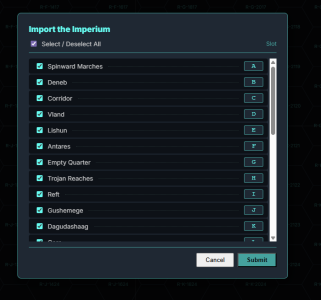
v0.7.4 has been pushed into production.
You can now try to import the entire OTU (not for the feint of heart!)
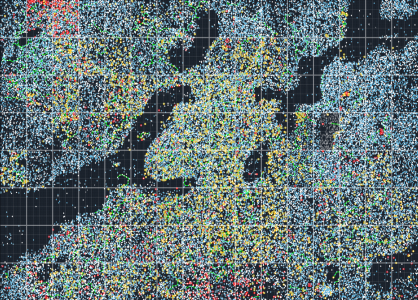 Some quick notes on Importing the Universe:
1) I have a one second wait time for each sector - so it takes a bit to load everything
2) Make sure to Save the JSON once you load it, so you never have to import it again - just load from your hard drive
3) It will be its most sluggish when zoomed out, and most responsive when zoomed in.
4) It will not work well for older or slower systems. Hell it is too frustrating for me zoomed out and I have 32GB memory.
5) This was done as a request by a user with some good system specs
6) Having all of these sectors loaded at once was not the intention of this program. I do, however, appreciate a challenge. So if you think you would enjoy working like this and have the right system for it, be my guest.
Replacing Foreven:
Want to replace any of these sectors with your own file (like Foreven)?
1) Mouse over the sector you want to replace (zoom in for smoother and better response results)
2) Press Control + S to select the Sector (you should see it highlighted)
3) Right Click->Populate->Manual Reset Clear (Note the sector # in the Clear Hex; 36 for Foreven)
4) Click the settings gear in the top right and choose Import Sector .tsv
5) Select your file - choose the sector number you noted (#36 for Foreven)
Notes on Size Limits:
1) If you do not ever expand the system generation you can operate large amounts of systems as long as it is not too frustrating to scroll. Your system specs will dictate how many sectors you can use before it is too frustrating to use (zoomed in is always better than zoomed out)
2) If you do want to expand system and socioeconomic information for each system (like I do) you will probably get to a limit of around 8 or 10 sectors before it will crash when you try to save your JSON. I have a number of options I am reviewing to expand this limit, but for now that is where we are. So if you download the Imperium and try to expand every system in every sector you will likely end up frustrated. For now you should be able to work safely with 8 or 10 sectors fully generated without too much of a problem.
Use it here:
https://bartlebythecoder.github.io/traveller_magnus/hex_map.html
Full code here:
https://github.com/bartlebythecoder/traveller_magnus