• Welcome to the new COTI server. We've moved the Citizens to a new server. Please let us know in the COTI Website issue forum if you find any problems.
  • We, the systems administration staff, apologize for this unexpected outage of the boards. We have resolved the root cause of the problem and there should be no further disruptions.

New Traveller Ship Builder

Hi Ross, I received an error message as soon as I landed on the next page after selecting the ship-builder option.
 
Thanks Ross, that's an interesting page. The weapon allocation follows their design process (obviously) but I'm not sure it has a very intuitive flow to it.
 
Hey can't set TL it defaults to TL8 and won't let you change it, Computer selection is locked to Model 5, also can't change from Single Turrets to other types.

can't find other issues since TL is locked
 
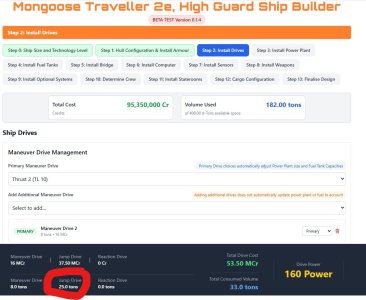
1. Tab 2, the Jump drive size calculation is incorrect. Jump 2 is 5% of hull: 400*.05=20 Cost is MCr1.5 per ton 20*1.5=30.
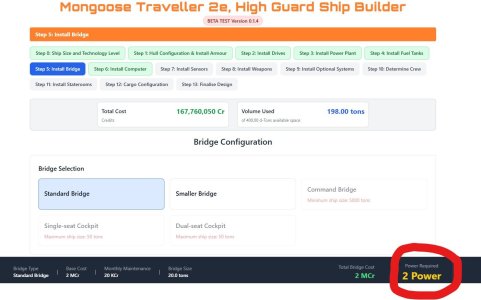
2. Tab 5 shows the correct tonnage (20) and cost (2MCr) but no option for Holographic Controls (Pg. 186 of Core Manual), yet the power for holographic controls (2) has been allocated.
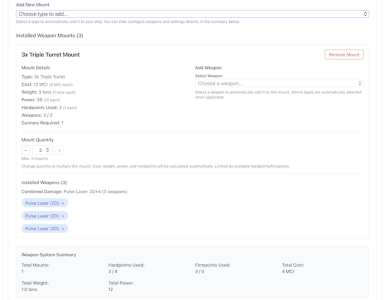
3.Tab 8 does not show the 1 power that each triple turret is suppose to be allocated in the total. (Pg. 184 of Core Manual)

The bottom label on Tab 2 should be a constant and the Total Cost and Volume Used numbers gave no indication how they were calculated. IMHO

Ad Astra
 

Attachments

  • MGT2ShipBuilerTAB2.jpg
    MGT2ShipBuilerTAB2.jpg
    122.3 KB · Views: 6
  • MGT2ShipBuilerTAB5.jpg
    MGT2ShipBuilerTAB5.jpg
    116.4 KB · Views: 5
There is a new Ship Builder in Traveller Tools at https://traveller-ship-builder.netlify.app/

There are some issues, but it's a great start.

I don't really understand the Module Builder. I don't have and I have not read the Mongoose supplement for building a ship with modules.

So is there a primer or something? Because it looks like all the same steps for building a starship. So I don't see (in the builder) a differentiation.


A is it module supposed to be standard size? It would suggest that modules (like cargo containers) would be of standard size to fit standard mounts.

Is this building a modular ship completely? Are you building modules to swap in and out at star port? I get the importance and usage, but I don't understand what the builder is creating.
 
I don't really understand the Module Builder. I don't have and I have not read the Mongoose supplement for building a ship with modules.

So is there a primer or something? Because it looks like all the same steps for building a starship. So I don't see (in the builder) a differentiation.


A is it module supposed to be standard size? It would suggest that modules (like cargo containers) would be of standard size to fit standard mounts.

Is this building a modular ship completely? Are you building modules to swap in and out at star port? I get the importance and usage, but I don't understand what the builder is creating.
There are a lot of things about larger ship design that don't make sense to me. It's pretty much why I don't use them.
 
I don't really understand the Module Builder. I don't have and I have not read the Mongoose supplement for building a ship with modules.
I believe the Module Builder isn't quite finished, bug fixing in the Ship Builder is prioritised.
From the bug listing in the Ship Builder:

Module Builder & Breakaway Hulls Status​

The Module Builder and Breakaway Hulls systems are currently broken and will remain broken until bugs in the Main Ship Builder are fixed first, as these systems are dependent on working code in the main Ship Builder.

Bugs for those systems will be added and addressed once we can confirm that the Main Ship Builder is working to a reasonable standard.

Thank you for your patience and understanding.

Modular Hulls are described in High Guard.

I think the Ship Builder is for building complete ships, the Module Builder is for modules for the ship. Something like the "Modular" Cutter, the Ship Builder builds the cutter, the Module Builder builds the modules.
 
Yes, I understand what modules are and what modules are for.

I don't understand the module builder.

The module builder is building a ship, not plug in modules.

The module builder is building hull, bridge, power plant, drives, weapons, cargo, fuel, consumables, etc. AKA a ship.

From the replies, I am guessing this is just a framework or place holder for now.
 
So, I just checked this out a moment ago and I notice, under "Ship Builder" - Step 0 - a user can only change the ship size by 100 dTon units
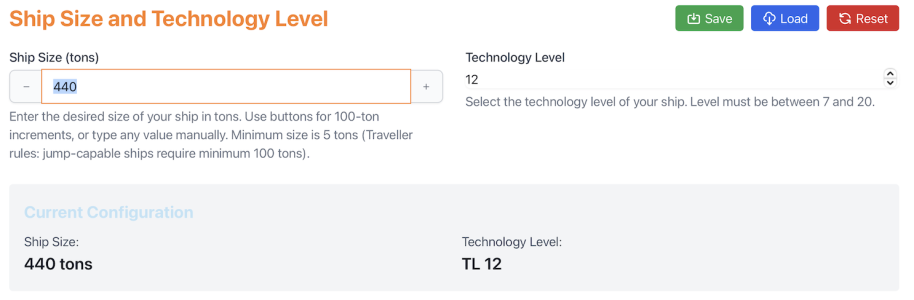
IMT game, my players own a custom 440 dTon yacht.
So, an attempting to re-create this custom ship appears - at very early first blush - to have issues.

Add to this, on Step 1: Hull
1) There is no "wedge" configuration
2) having selected "Streamlined", I cannot then select the radio button for "None" under armor

Adding:
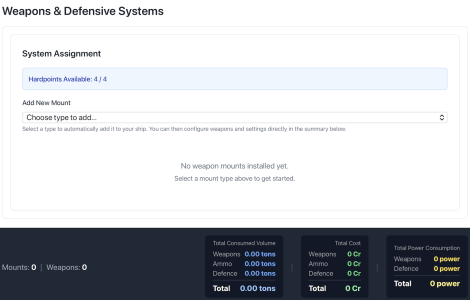
On the Weapons & Defensive Systems page, the design is automatically populated with three triple turrets - each populated with 3 pulse lasers
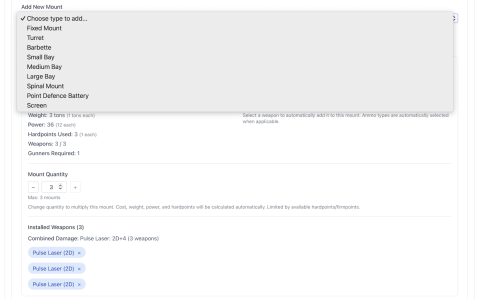
When I attempt to add another turret, I can only add a single weapon turret and can't alter that.
That self-populates with one pulse laser

So, I cannot replicate the design I have, with 4 Triple turrets where 3 have x3 Pulse Lasers and the forth has x2 pulse lasers and a sand caster
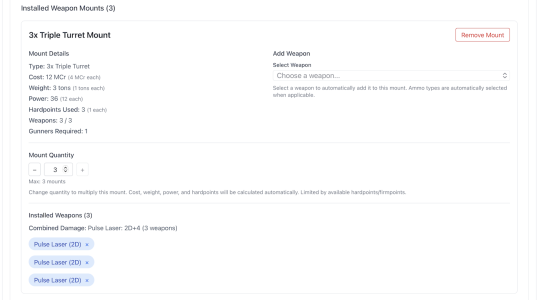
Regarding the crew, a 400 dTon ship needing Five Engineers is significantly more than all non-Mongoose Traveller editions for ~65 tons of total drive, but - OK

Adding a Medical Bay is "static" at 6 tons - treating up to 6 patients.
My design has a med-bay with a surgery and two recovery/treatment beds along with a small desk/office space - so, not able to replicate on this software
 
Last edited:
As far as I understand, the ship builder is not quite finished. Bugs exist.

So, I just checked this out a moment ago and I notice, under "Ship Builder" - Step 0 - a user can only change the ship size by 100 dTon units
Type in the tonnage directly, don't rely on the "+" button:
Skärmavbild 2026-01-08 kl. 23.42.28.png
Type the desired value, then click somewhere else or tab out to make it stick.


Add to this, on Step 1: Hull
1) There is no "wedge" configuration
There is no "wedge" config in HG'22, so that is correct.

2) having selected "Streamlined", I cannot then select the radio button for "None" under armor
Select protection level "0":
Skärmavbild 2026-01-08 kl. 23.44.32.png
That is no armour.


Adding:
On the Weapons & Defensive Systems page, the design is automatically populated with three triple turrets - each populated with 3 pulse lasers
I get a blank slate for a new ship:
Skärmavbild 2026-01-08 kl. 23.47.29.png


When I attempt to add another turret, I can only add a single weapon turret and can't alter that.
That self-populates with one pulse laser

So, I cannot replicate the design I have, with 4 Triple turrets where 3 have x3 Pulse Lasers and the forth has x2 pulse lasers and a sand caster
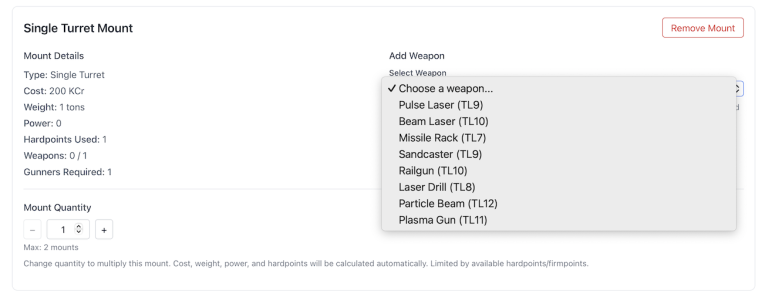
If I add three triple pulse laser turrets:
Skärmavbild 2026-01-08 kl. 23.56.08.png
I can then add another mount:
Skärmavbild 2026-01-08 kl. 23.57.45.png
In the new single turret, I can add as many weapons as I like:
Skärmavbild 2026-01-09 kl. 00.00.26.png

Regarding the crew, a 400 dTon ship needing Five Engineers is significantly more than all non-Mongoose Traveller editions for ~65 tons of total drive, but - OK
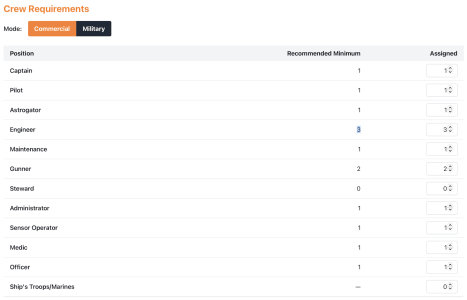
Should have 1 per 35 Dt, but rounding might be an issue.
With 440 Dt, J-3, M-3 and ~67 Dt drives, I get three Engineers:
Skärmavbild 2026-01-09 kl. 00.04.00.png


Adding a Medical Bay is "static" at 6 tons - treating up to 6 patients.
My design has a med-bay with a surgery and two recovery/treatment beds along with a small desk/office space - so, not able to replicate on this software
If it's a non-standard med bay, use common area?
A Mongoose standard Med bay is four Dt and can treat three patients (HG'22, p62).
 

Attachments

  • Skärmavbild 2026-01-08 kl. 23.52.46.png
    Skärmavbild 2026-01-08 kl. 23.52.46.png
    91.9 KB · Views: 1
Back
Top